Posts

Citrix ADC/NetScaler - EPA PRE Auth Policy: Hide "Skip Check" Button

Image
  The EPA "skip check" Button for Pre Authentication EPA Policys and NFactor is added only from the 13.0-45x+ Builds. So if you are using older Versions, your users don't have the option to skip the EPA check. If you want to hide this button please do the following: 1. Append the below css style in /var/netscaler/logon/themes/<customTheme>/style.css #skipbutton { display: none; } 2. Flush browser and ns chache for changes to reflect immediately. NS cache can be flushed using below command : flush chache contentgroup loginstaticobjects 3. since CWA opens webview, the portal changes will feflect there also. So any local cache of CWA must also be flushed for changes to take effect.
How to: export all Outlook Singantures from User Profiles to specified Folder

Image
This Script will export your Outlook Signatures from a User Pprofile Management Share (like Citrix UPM) and create a folder on a specified Path were it stores the Signatures so that you can import it on a new share or sth like that. $UserFolders = Get-ChildItem \\ Example$ \ XAProfile ( Path to your User files) $path2 = " exampleFolder \AppData\Roaming\Microsoft\Signatures" (Path to Signatures in your Userfolder) $Destination = " C:\Signatures " ( your export path ) foreach ($Item in $UserFolders) {robocopy /copy:DAT \\ Example$ \ XAProfile \$item\ examplefolder \AppData\Roaming\Microsoft\Signatures  $Destination\$Item }

Add Users to a Active Directory Group with Powershell and remove them from the old group

Image
Moving a big amount of Users from one AD Group to another can be easily done with Powershell.  At first create a .txt file where you can copy all of your Users you want to remove from an old AD Group and add them to a new one. I called this "userslist.exe" and placed it under C:\Users\etc Things you need to replace are marked in RED $users = Get-Content C:\ YOUR_PATH \userslist.txt $userId = @() foreach ($user in $users) { $userId += Get-ADUser $user } #AD Group Binding $oldGroup = Get-ADGroup ' YOUR_OLD_GROUP_NAME ' $newGroup = Get-ADGroup '  YOUR_NEW_GROUP_NAME ' foreach ($user in $userId) {    Remove-ADGroupMember -Identity $oldGroup -Members $user -Confirm:$false    Add-ADGroupMember -Identity $newGroup -Members $user -Confirm:$false      } 

Wrong language in "devices and drives"

Image
One of our customers had a wrong language setup on his published explorer.exe when opening it. The hole explorer.exe was on English, Except the "Devices and drives". They were on another language.    His environment was deployed via MCS on Citrix 1912 LTSR. The Master Image, the Server and the customers devices were all on English. After checking the Master Image I did following changes to get it working: Under:  Control Panel\All Control Panel Items\Language\Advanced settings set following settings: Under copy settings the yellow marked were set in German instead of English: After copying the settings with the checkboxes everything was now in English: After rolling out the master image again everything was now like expected.

How to activate logging for Citrix Exploit 1 and 2

Image
Daniel Weppeler postet a link on how to activate Citrix Logging for Exploit 1 and 2: https://twitter.com/_DanielWep/status/1217022904073801728 #CVE201919781 #Citrix Create MessageAction: add audit messageaction MsgAct_CVE WARNING "\"CVE Attack from IP \"+CLIENT.IP.SRC+\" - URL: \"+HTTP.REQ.URL.PATH.HTTP_URL_SAFE+\" (headers: \"+HTTP.REQ.FULL_HEADER.HTTP_HEADER_SAFE+\")\"" -logtoNewnslog YES Enable userDefinedAuditlog: set audit syslogParams -logLevel ALL -userDefinedAuditlog YES set audit nslogParams -logLevel ALL -userDefinedAuditlog YES Bind #Syslog Message Action to CVE Responder Policy: set responder policy ResPol_Fix_CVE-2019-19781 -logAction MsgAct_CVE

How to check, if your NetScaler is affected by CVE-2019-19781: Citrix Exploit 1 and 2

Image
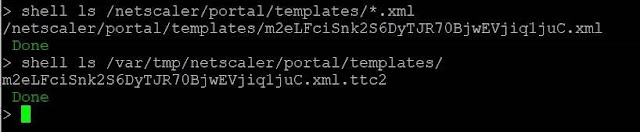
You can check if your NetScaler is affected by CVE-2019-19781 with following commands: Indicators of compromise To get an idea wether your Citrix ADC is compromised I’d recommend to perform (at least!) the following steps Template files The exploits all write files to two different directories. Scan those via: shell ls /netscaler/portal/templates/*.xml shell ls /var/tmp/netscaler/portal/templates shell ls /var/vpn/bookmark/*.xml If you find files similar to the following you are likely to be compromised Apache Log files In addition, attempts to exploit the system leave traces in the Apache httpaccess log files. Those you can validate via: shell cat /var/log/httpaccess.log | grep vpns | grep xml shell cat /var/log/httpaccess.log | grep "/\.\./" shell gzcat /var/log/httpaccess.log.*.gz | grep vpns | grep xml shell gzcat /var/log/httpaccess.log.*.gz | grep "/\.\./" The following output is found on a system that was exploited: Howev...

Additional NetScaler Vulnerabiliy to CVE-2019-19781: Citrix Exploit 2

Image
Information from Citrix Technology Professional Matthias Schlimm: Hello everybody,   An additional vulnerability was found in 2 HTTP HEADERN today, following CVE-2019-19781 from December 2019, i.e. All systems that have already passed the "Mitgation Steps from article https://support.citrix.com/article/CTX267679" cannot avoid making another change. Unfortunately, there is currently no official blog or supplement from Citrix available, so I can only share what I have received from Citrix sources here:     --snip --- There is a new attack against the CVE, it seems like it can exploit using 2 headers. You can read more about here: https://isc.sans.edu/forums/diary/Citrix+ADC+Exploits+are+Public+and+Heavily+Used+Attempts+to+Install+Backdoor/25700/I’ve updated my responder policy expression with:   HTTP.REQ.URL.DECODE_USING_TEXT_MODE.CONTAINS (“/ vpns /“) && (! CLIENT.SSLVPN.IS_SSLVPN || HTTP.REQ.URL.DECODE_USING_TEXT_MODE.CONTAINS (“/../“)) || http.req.hea...

Citrix Server stays down after scheduled reboot

Image
We had the situation that randomly some Terminalserver stayed down after the scheduled reboot from Studio. They needed to be restarted  manually. To avoid this Problem following will do the trick. Create a GPO with the below registry entries on all DDC and restart the broker service. Also on Restart Schedule on DDC at restart duration kindly select restart all machines with in 30 minutes or 1 hr instead of all at the same time. HKEY_LOCAL_MACHINE\SOFTWARE\Citrix\DesktopServer\RebootSchedule Name: ShutdownTimeoutRecovery Type: DWORD Value: 1 (Decimal) HKEY_LOCAL_MACHINE\Software\Citrix\DesktopServer Name : MaxRegistrationCompletionTimeSecs Type : Reg_Dword Value : 2400(Decimal) Name : MaxFailedRegistrationsAllowed Type : Reg_Dword Value : 0xFFFFFFFF (Hex)

Export a list of all XenApp 7.x published applications via Powershell

Image
If you want to export a list of all published applications used in your environment you can do this with PowerShell. First add the Citrix PowerShell snapin: asnp Citrix.* Then run the Command which will export a TXT File which contains the Published Name and the Application Name. This can be extended to almost anything you need. More parameters you'll find in the Citrix Developer Documentation: https://developer-docs.citrix.com/projects/delivery-controller-sdk/en/7.17/Broker/Get-BrokerApplication/ MaxRecordCount 300 extends the output to 300 objects. The default value is 250. If you have more then 250 Applications you need this value.  Get-Brokerapplication -MaxRecordCount 300 | Select-Object PublishedName,ApplicationName | fl >c:\application.txt Then you'll find the TXT file in your specified output folder: It will be displayed like this:

Empty start menu with Citrix Profile Manager after upgrading to XenApp 7.15 LTSR CU3

Image
After upgrading from XenApp version 7.11 to 7.15 LTSR CU3 the start menu for all Users stays empty. There are no programms or other shortcuts left which were added from the User. As workaround there is a registry empty which will solve the problem. update -> HKEY_CURRENT_USER -> Software\Microsoft\Windows\CurrentVersion\ImmersiveShell\StateStore -> ResetCache -> REG_DWORD -> 00000001 Afterwards your start menu will roam just like before without any issues.

How to: move FSMO Roles, Demote and re-promote a Domain Controller with PowerShell

Image
Here are the commands you need if you want to demote and re-promote a Domain Controller with PowerShell Move FSMO Roles: Move-ADDirectoryServerOperationMasterRole -Identity nameofthedcwhereyouwanttomovetheroles -OperationMasterRole pdcemulator, ridmaster, infrastructuremaster, schemamaster, domainnamingmaster (the roles you want to move) Check if everything worked: Get-ADDomain | Select-Object InfrastructureMaster, RIDMaster, PDCEmulator Demote Demote Test Test-ADDSDomainControllerUninstallation -DemoteOperationMasterRole - LastDomainControllerInDomain -RemoveApplicationpartitions (Only needed when it is the last Domain Controller in your Environment) Start Demote Uninstall-ADDSDomainController -DemoteOperationMasterRole -RemoveApplicationPartition Promote Promote: Windows features Install-WindowsFeature -name AD-Domain-Services -IncludeManagementTools Test-Promote: Test-ADDSForestInstallation -DomainName your.dom...

How to: Create a Client Certificate for LDAPS with OpenSSL

Image
Today I will introduce you my new article on how to create a client certificate with OpenSSL so that you can use it for LDAPS You need to create two files in your new folder which we will need later on (I prefer notepad++ for the creation of my files): 1             1.  Your request.inf file 2             2.  Your v3ext.txt file 1.     Request.inf (save as .inf with notepad++) [Version]  Signature="$Windows NT$"  [NewRequest]  Subject = "CN= your-active-diretory.fqdn” f.ex : “simonAD.testinfo.com” (enter the FQDN of your AD Server)  KeySpec = 1  KeyLength = 2048 (enter the key length with fits your need. Some say you need to take at leas 2048 to make LDAPS work)  Exportable = TRUE  MachineKeySet = TRUE  SMIME = FALSE  PrivateKeyArchive = FALSE  UserProtected = FALSE  UseExistingKeySet = FALSE ...

Citrix ShareFile - files are not scanned by anti virus software

Image
If the uploaded files weren't scanned from the anti virus software you should check the ShareFile Logs. You will find an error saying: The remote server returned an error: (407) Proxy Authentication Required As solution you'll need to restart the ShareFile Server or the ShafreFile Service. The error is caused by changes on your proxy because ShareFile won't re-authenticate after the first authentication.

Slow login after shutdown XA6.5 Data Collector

Image
If your Data Collector is facing a problem with slow login times after a shutdown you'll find a solution for this problem in a blog post from my Co-worker and CTA Matthias Schlimm: Click here for the solution

New product names for Citrix

Image
Like most of you may heard, Citrix has changed again their product names. Nothing the world really needs but we have to deal with it. So here we go: Citrix Receiver      = Workspace App XenApp                 = Virtual Apps XenDesktop          = Virtual Desktops XenServer             = Citrix Hypervisor NetScaler ADC     = Citrix ADC A full list you'll find here: citrix-product-guide/

Private fix before installing Citrix 7.15 CU2 for VDA

Image
Before you install the version 7.15 CU2 for VDA you need to get a private fix (LC9648) from Citrix. Otherwise it can happen that your black screen error when booting your provisioned machines still exists. continued-problems-with-black-screen-at-session-start-with-windows-10

Last stable running NetScaler 12.x version

Image
Like you may also experienced the last versions of NetScaler 12.x were so buggy that it is almost impossible to work correctly with them. After a short talk with colleagues I would recommend the version 12.0.56.20 as latest stable running version.

Citrix and Mouse cursor on 2K Monitors

Image
Mouse cursor disappearing in Citrix sessions. Mostley on 2K Monitors with a scale of 150%. When changing the scale to 125% or 175% it works. Due to the fact that we need to stay with 4.9 LTSR we couldn't use version 4.11 were this problem is fixed. You can solve this problem with a private fix you can request from Citrix for version 4.9 LTSR

Citrix: Mouse Cursor is distorted or disappearing with 2K Monitors

Image
One of our Customer had a problem with his mouse cursor in a Citrix Session. The mouse cursor of the employees were distorted or disappearing when they used a 2K Monitor. The error is known like you can see under point 4 and 5: CTX229052 Windows 10 Fall Creators Update (v1709) – Citrix Known Issues The error is solved in Citrix Receiver version 4.11 like you can read here: Citrix Receiver for Windows 4.11 solved Problems Unfortunately the customer uses LTSR and we are not able to update from 4.9 LTSR to 4.11. We hoped that the fix will be in CU2 which will be released soon.  The Cursor problems won't be fixed in CU2. The Fix will be included in CU3.  But it's possible to get a private Fix for this error when contacting Citrix Support . That's how we solved the problem.

Windows 10: Using CopyProfile for the “Start Menu” has been deprecated

Image
The Customer had problems with Windows 10 and also with Server 2016 where the TileBar or the Startmenue were not displayed right and didn't work like expected. Therefore he used Sysprep for Derfaul UserProfile to solve the problem. Now Microsoft announced that this is not an supported solution. https://blogs.technet.microsoft.com/yongrhee/2018/03/12/windows-10-using-copyprofile-for-the-start-menu-has-been-deprecated/